The best WordPress hosting for a small business is fast, secure, backed up and easy to get help with, at a price that stays fair after the first year. There is no single best host for everyone. This guide explains the types of hosting, the server specs WordPress itself recommends and seven checks to run before you choose.
Key takeaways
- Check the specs: WordPress recommends PHP 8.3 or higher, MySQL 8.4 or MariaDB 10.11 or higher, and HTTPS.
- Shared hosting suits small sites; managed WordPress hosting adds speed, updates and support for a higher price.
- Compare renewal prices, backups and support, not just the first-year discount.
Disclosure: this article contains a referral link to Hostinger, the host semrs.com runs on. If you buy through it, SEMRS may earn a referral reward at no extra cost to you.
What WordPress hosting is
WordPress is software. Hosting is the server that runs it and serves your pages to visitors. A good host keeps your site fast, online and secure. A poor one causes slow pages, downtime and security problems, which hurt both visitors and search rankings.
Types of WordPress hosting
| Type | What you get | Best for |
|---|---|---|
| Shared hosting | Space on a server shared with other sites | New and small sites with modest traffic |
| Managed WordPress hosting | Servers tuned for WordPress, with updates, caching and expert support | Business sites that value speed and support |
| VPS or cloud hosting | Your own virtual server and resources | Growing sites with technical help |
| Dedicated server | A whole server for your site | Large, high-traffic sites |
Most small business sites start on good shared or managed WordPress hosting. Move up when traffic, a store or speed needs justify it.
The specs WordPress recommends
WordPress.org recommends that hosts support:
- PHP 8.3 or higher
- MySQL 8.4 or higher, or MariaDB 10.11 or higher
- HTTPS support
Older versions may still run WordPress, but they are slower and may stop getting security updates. Ask any host which versions they offer and how they handle upgrades.
7 checks to find the best WordPress hosting
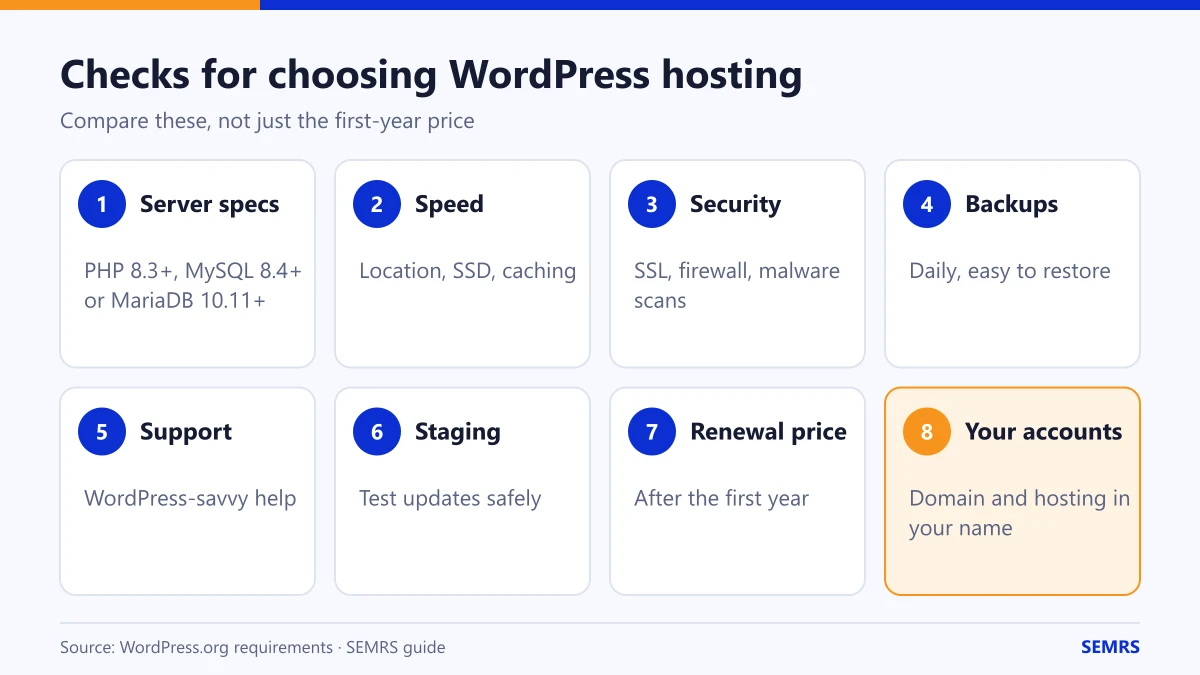
- Server specs: current PHP and database versions, as above.
- Speed: server location near your customers, solid-state storage and built-in caching. Google’s Core Web Vitals reward fast pages.
- Security: free SSL certificates, a firewall, malware scanning and isolation between sites on the same server.
- Backups: automatic daily backups kept for at least a couple of weeks, with easy restores. Keep your own off-site copy too.
- Support: WordPress-savvy help by chat or ticket, with clear response times.
- Staging: a copy of your site to test updates safely before they go live.
- Price after the first year: introductory deals often double or triple on renewal. Compare the renewal price.
The host we use: Hostinger
semrs.com runs on Hostinger. Measured against the checks above, our site runs PHP 8.3, pages are served through Hostinger’s CDN with LiteSpeed caching, and the hPanel control panel includes a staging tool for testing changes. We still keep our own backups as well as the host’s.
New customers who sign up through our Hostinger referral link get 20% off the first term of a new plan, according to Hostinger’s referral page in November 2026. The discount does not apply to renewals, so check the renewal price before you choose a long or short term. It is the host we chose for our own site, but compare it with the checks above for yours.
Web hosting and your WordPress domain
Register your domain in your own name, ideally with a registrar separate from your host. If you ever change hosts, you keep full control of the domain. Make sure you have the login details for both accounts, even if a designer set them up.
Speed matters for SEO
Hosting is the base of site speed. Google’s Core Web Vitals guide sets targets for loading, responsiveness and layout stability. A good host, a light theme, compressed images and caching together usually meet them. Our free image compressor helps with the images. Our guide to SEO for small business explains why speed matters for rankings.
WordPress hosting mistakes to avoid
- Choosing on first-year price alone.
- Relying only on the host’s backups.
- Letting a designer own the hosting account.
- Ignoring PHP updates until the site breaks.
- Installing dozens of plugins that slow the site down.
Should you use managed WordPress hosting?
Managed hosting costs more but handles updates, caching, security and expert support. It suits owners who would rather not manage technical tasks. If you prefer cheaper shared hosting, a care plan can cover updates and backups instead.
Frequently asked questions
What is the best WordPress hosting for a small business?
The best host for you meets WordPress’s recommended specs, is fast where your customers are, includes daily backups and security, offers WordPress-savvy support and has a fair renewal price. Compare those points rather than headline prices.
Is shared hosting good enough for WordPress?
For many small sites, yes, if the host is reputable and the site is light. Busy sites, stores and sites with many plugins often need managed or VPS hosting.
What PHP version does WordPress need?
WordPress.org recommends PHP 8.3 or higher, with MySQL 8.4 or MariaDB 10.11 or higher, and HTTPS.
Should my domain and hosting be with the same company?
It is convenient but not required. Many owners keep the domain with a separate registrar so they can change hosts easily. Either way, register it in your own name.
Can SEMRS manage our WordPress site and hosting?
SEMRS builds WordPress sites on hosting you own and offers care plans from $39 a month for backups, monitoring and updates. See our content management services and pricing.
Want a faster WordPress site? Request a free review.
Sources: WordPress.org, Requirements; Google Search Central, Understanding Core Web Vitals.