Google offers two main ways for local businesses to pay for leads from search: Local Services Ads (LSA) and regular Google Ads search campaigns. They look similar to a searcher but work very differently for you. Local Services Ads charge per lead and carry a trust badge; Google Ads charge per click and give you far more control. This Local Services Ads vs Google Ads comparison will help you decide which to run first, and when to run both.
On this page
Key takeaways
- Local Services Ads charge per lead and show a Google Guaranteed or Google Screened badge.
- Google Ads charge per click but give full control over keywords, ads and landing pages.
- Eligible local service businesses often start with Local Services Ads and add Google Ads later.
What are Google Local Services Ads?
Local Services Ads appear at the top of some searches, often above regular ads, with your business name, star rating, a badge and a “call” or “message” button. Instead of paying for clicks, you pay when a customer contacts you through the ad (see Google’s Local Services Ads page).
Businesses must pass Google’s screening for their category. Home service categories (such as plumbers, electricians and HVAC) typically earn a Google Guaranteed badge, while professional services (such as lawyers, financial planners and real estate agents) can earn a Google Screened badge. Screening can include background checks, license and insurance verification, depending on category and country. Availability varies by category and location.
What are Google Ads search campaigns?
Regular search ads appear for the keywords you choose, with your own headlines, descriptions and links. You pay each time someone clicks, whether or not they call you. You control keywords, ad text, landing pages, schedule, budget and bidding.
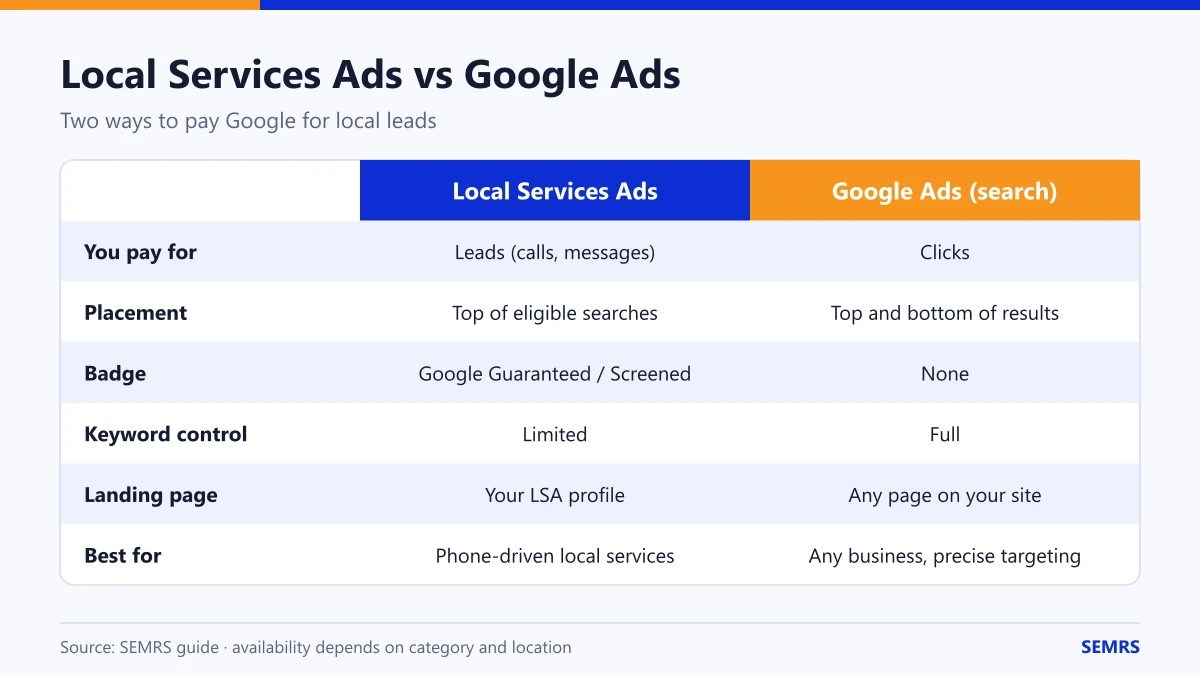
Local Services Ads vs Google Ads: side-by-side comparison
| Local Services Ads | Google Ads (search) | |
|---|---|---|
| You pay for | Leads (calls, messages, bookings) | Clicks |
| Placement | Top of eligible local searches | Top and bottom of search results |
| Badge | Google Guaranteed or Google Screened | None |
| Control over keywords and ad text | Limited; Google matches by service and area | Full |
| Landing page | Your LSA profile | Any page on your website |
| Setup | Verification and screening required | Account setup and campaign build |
| Best for | Phone-driven local services | Any business, many services, precise targeting |
Pros and cons of Local Services Ads
Pros
- Pay only for leads, not clicks.
- Prominent placement and a trust badge.
- Reviews and response time help your ranking within LSA.
- You can dispute leads that are clearly invalid, within Google’s rules.
Cons
- Only available for eligible categories and areas.
- Little control over which searches trigger your ad.
- Verification takes time.
- Leads go to your profile, not your website, so you build less of your own data.
Pros and cons of Google Ads
Pros
- Works for almost any business and service.
- Full control over keywords, messages, landing pages and budget.
- Can promote high-margin services specifically.
- Brings visitors to your website, where you can track and retarget them.
Cons
- You pay for every click, including people who never contact you.
- Needs skilled setup: negative keywords, conversion tracking and landing pages.
- Costs in competitive industries can be high; see our Google Ads cost guide.
How LSA ranking works
Google has said that factors such as your proximity to the customer, your review score and number of reviews, your responsiveness to leads, your business hours and any serious complaints can affect how often your Local Services Ad appears. In practice: answer calls quickly, keep hours accurate, ask happy customers for reviews and mark leads as booked or not in the dashboard.
Which should you choose?
- Choose Local Services Ads first if you are in an eligible home or professional service category, most of your customers call before buying, and you can answer the phone reliably.
- Choose Google Ads first if your category is not eligible, you want to promote specific services, or you sell online.
- Run both once LSA is steady: LSA captures the “call now” searches while Google Ads targets specific services and sends traffic to your landing pages.
Whichever you start with, a complete Google Business Profile and strong reviews help every local channel.
Frequently asked questions
How much do Google Local Services Ads cost?
You pay per lead, and the price varies by category and location. Google shows estimated lead costs when you set up your account, and you can set a weekly budget.
Can lawyers and financial advisors use Local Services Ads?
In many locations, yes, under the Google Screened program, which includes checks such as license verification. Eligibility depends on the category and country.
Do Local Services Ads replace SEO?
No. They capture people ready to call now. SEO builds visibility for the many searches LSA does not cover and does not charge per lead.
Can I get refunds for bad leads?
Google allows you to dispute leads that fall outside your services or area, or are spam, within its policies and time limits.
Can SEMRS set up Local Services Ads?
Yes. SEMRS can prepare your profile, manage Google Ads alongside it and report leads from both. See our paid ads service or get a quote.