In short
Organic traffic usually drops because of indexing, search intent, titles or internal links — not because rankings moved. Work these seven checks in order, cheapest first, starting with your five highest-impression pages in Search Console. Most lost traffic is recovered before a single new article is written.
Organic traffic almost never falls for the reason people assume. The instinct is to blame rankings and start writing more posts, but in most audits the cause is duller and closer to hand: a page that stopped being indexed, a title nobody clicks, an article answering a question the audience has moved past, or a good page with nothing linking to it.
This is the order we work through when organic traffic drops, arranged so the cheapest checks come first and the expensive ones only happen if they are genuinely needed.
Why organic traffic falls before rankings do
A page can hold the same position for months and still lose half its clicks. The results around it change, a competitor rewrites their snippet, or the intent behind the query shifts. Tracking position alone hides all three. Clicks and impressions read together expose them in minutes: impressions steady with clicks falling is a snippet problem, while both falling together is usually an indexing or intent problem.
Rule out the boring explanations first
Before touching a single page, account for the dull causes. Seasonality moves whole industries every year, so compare the period against the same weeks last year rather than last month. A site migration, a theme change or a new consent banner can break tracking without touching rankings, which shows up as traffic vanishing overnight on every page at once rather than gradually on a few. And a filter or date range left applied in a report has ended more than one panic. If the drop is perfectly uniform across every page, suspect measurement before content.
1. Confirm the page is indexed
Put the URL through the URL Inspection tool in Search Console. If Google is not indexing it, nothing further on this list matters. The usual culprits are a noindex tag left behind after a redesign, a canonical tag pointing at a different page, or a robots.txt rule blocking a whole folder. Google sets out the mechanics in its SEO Starter Guide, and the fix is usually one line of markup plus a re-crawl request.
2. Match the page to search intent
Search your keyword and read the first five results properly. If every one is a comparison table and yours is a company story, the page will not hold its place no matter how well written it is. Intent is a format decision, not a tone decision. The page has to be the kind of thing the reader already expects to find, or the click goes elsewhere and the ranking follows it down.
3. Rewrite the title that loses the click
In Search Console, sort pages by impressions and look for ones whose click-through rate sits well below the rest of your site at similar positions. High impressions with low clicks means the ranking is doing its job and the invitation is failing. Put the keyword near the front, make the promise concrete, and let the description say what the reader walks away with rather than listing what the page contains.
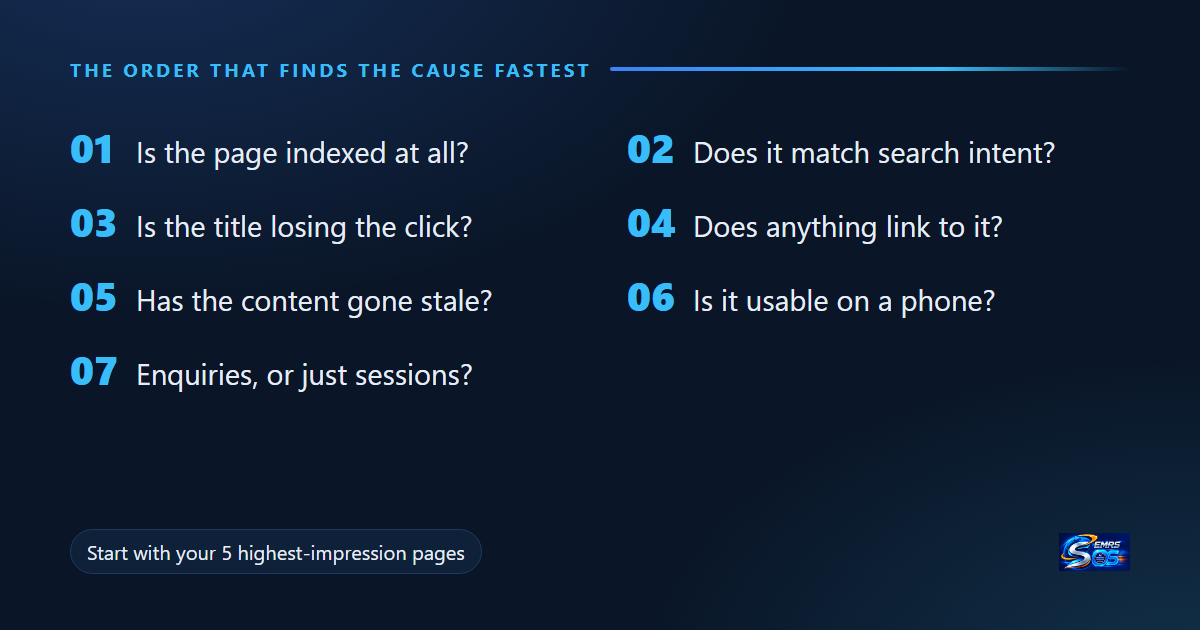
4. Give the page internal links
Pages sitting four clicks from the homepage get crawled less often and inherit less authority. Link to them from pages that already earn impressions, using anchor text that describes the destination instead of saying “read more”. Our piece on why one campaign for twenty countries fails is the kind of article worth linking to deliberately rather than leaving in an archive. Open your blog index, mark the five posts that already get impressions, and make sure each one points at the page you are trying to lift.
5. Refresh what has gone stale
Organic traffic decays quietly on pages full of years, prices, tool names and screenshots. Update the facts, replace the screenshots, delete what is no longer true, and keep the URL exactly as it is. A refreshed page keeps the links and history it has already earned. A new URL starts from nothing and asks Google to work out the relationship for you.
6. Check it on a real phone
Most searches happen on a phone, on a connection worse than your office wifi. If the page takes several seconds to become usable, or the first thing a reader meets is a consent banner covering the headline, many of them return to the results. That return is a signal, and it is one you can fix without writing a word.
7. Measure enquiries, not sessions
Search Console tells you what happened in search: impressions, clicks, queries and position. GA4 tells you what happened after the click, and which landing pages turn readers into enquiries. Neither answers the question on its own. Connect both, define what actually counts as a conversion for your business, and judge every page on enquiries rather than raw sessions. A page with modest organic traffic producing two enquiries a month beats a page with ten times the visits and none.
The three reports worth keeping open
You do not need a dashboard wall. Three views answer nearly every question. Search Console’s Pages report, sorted by impressions, shows where you are already visible and therefore where a title rewrite pays off immediately. Its Queries report, filtered to a single page, shows what that page is actually being found for, which is often not the keyword it was written around. GA4’s landing page report, with your conversion defined, shows which of those visits turn into enquiries. Read in that order, the three take about ten minutes and tell you what to do next.
Mistakes that cost the most time
Three patterns waste more effort than anything else. Publishing new articles while existing pages sit unindexed, which adds work without addressing the cause. Chasing keyword volume instead of intent, which produces pages that rank briefly and convert never. And rewriting pages that were never getting impressions in the first place, where the problem is visibility, not quality. Check the data before rewriting, because the fix for an invisible page and the fix for an unpersuasive one are completely different.
A plan you can finish this afternoon
Take your five highest-impression pages. For each one, confirm it is indexed, compare its clicks against its position, add two internal links pointing to it, and rewrite the title of whichever has the worst click-through rate. That is a single focused afternoon, and it is where most lost organic traffic is recovered – before anyone writes a new article.
Work down the list in order. Skipping to step five because writing feels productive is how teams spend a quarter producing content for pages Google was never indexing in the first place.
When it is worth bringing in help
If the list above is clear but nobody has time to run it every month, that is the honest case for outside help. Our SEO and content services cover exactly this loop: research, the content itself, internal linking, and reporting that shows which pages earn enquiries rather than applause.
Final verdict: organic traffic is usually recoverable without new content
Across the audits we run, the cause is almost never the one people expect. Rankings get blamed; indexing, search intent, titles and internal links are what actually moved. That is the good news — all four are fixable in days rather than quarters, and none of them need a single new article.
The order matters more than the effort. Working cheapest-first finds the real cause before you spend on the expensive fix, and it stops a team writing content for pages Google was never indexing in the first place.
If you do one thing after reading this: open Search Console, sort by impressions, take your five highest pages, and run checks one to four on each. That is where most recovered organic traffic actually comes from.
Want this run for you every month? That is exactly what our SEO and content services cover — the audit loop, the fixes, and reporting that shows which pages earn enquiries rather than applause. Tell us about your site and we will start with these same seven checks.
Frequently asked questions
Why did my organic traffic drop but my rankings stayed the same?
The results around you changed. A competitor rewrote their snippet, or an AI overview took the click. Position is not clicks — compare impressions against clicks in Search Console.
How long does it take to recover organic traffic?
Usually two to six weeks after the fix, once the page is recrawled. Indexing fixes can show within days; content and internal-link changes take longer.
Should I write new content when organic traffic drops?
Usually not first. New content is the most expensive fix and the slowest to pay back. Run the indexing, intent, title and internal-link checks before writing anything.
What is the fastest check when organic traffic falls?
Confirm the page is still indexed. It takes one minute in Search Console URL Inspection and rules out the single most common cause.